
Combinations
A pizza meal, a sandwich deal or a half-and-half pizza: a combination is a product the customer puts together from other products on your menu.
A combination is an ordinary product on your menu, with a name, code, price and VAT rate, but with one difference: the customer puts it together from other products on your menu. Think of:
- a pizza meal: any 2 pizzas and 2 soft drinks for € 24.95;
- a sandwich deal: 2 sandwiches and a drink for € 10;
- a platter: with fries or rice, and a soft drink;
- a half-and-half pizza: one half margherita, the other salami, for the price of the dearer half;
- 2nd pizza free or 3 for the price of 2.
The customer picks one or more products in each slot. Every chosen product stays itself: the pizza in the pizza meal can get extra cheese, counts as a pizza in the reports, and keeps its own VAT rate.
You make combinations the same way in KwikEat Desktop and in KwikEat Merchant.
Making a combination
- Add a product, for instance Pizza meal with code
50and price € 24.95. Preferably put combinations in a group of their own, such as Meals or Deals (why: see Keep in mind). - Above the options on the right, choose Combination.
- Choose the Price (see below).
- Tap Add slot and give the slot a name and a Number: Pizza, number 2.
- Under To choose from, pick a whole group (All of Pizza) or single products, and tap Add.
- Repeat for every slot: Drink, number 2, All of Drinks.
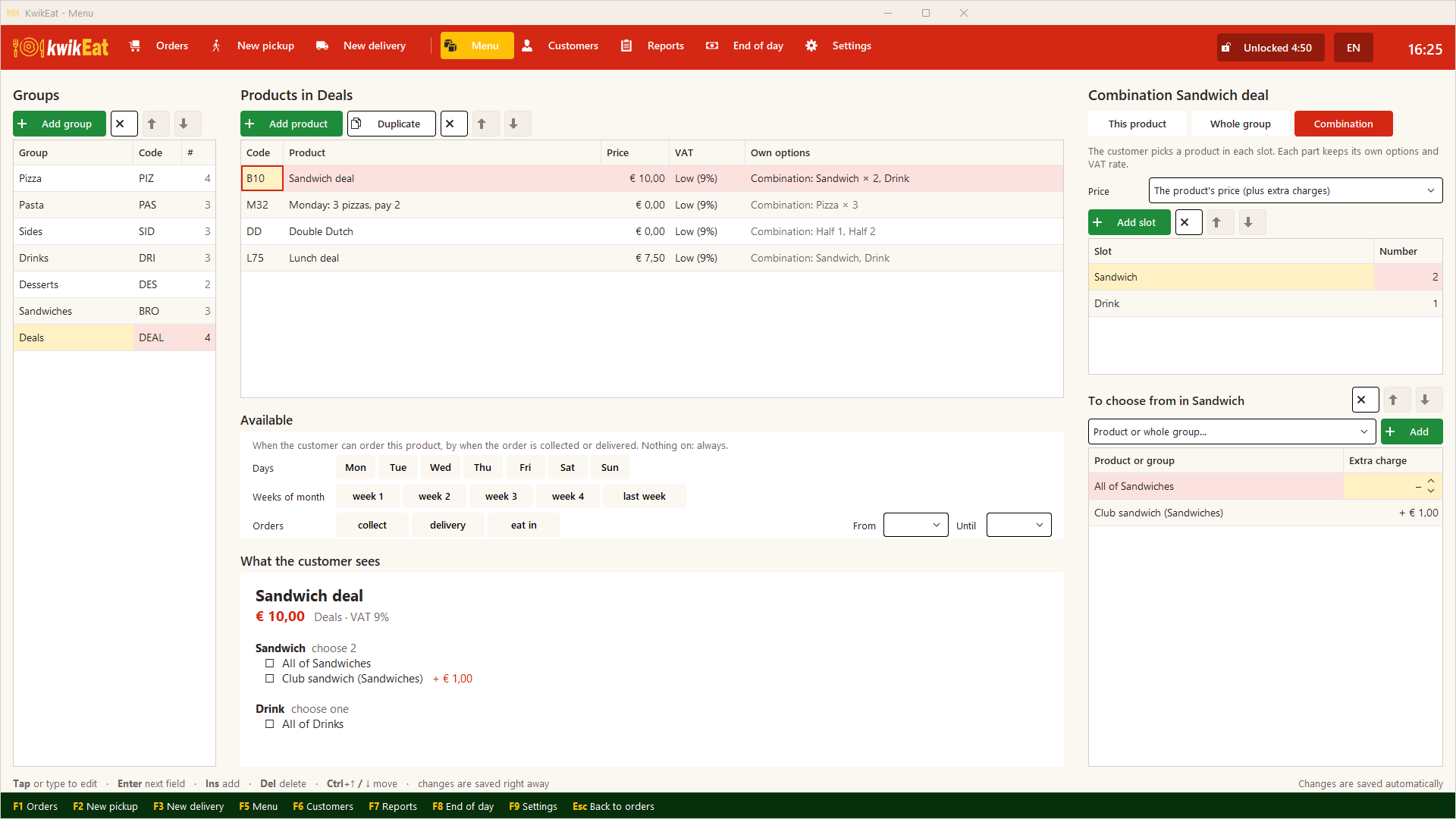
A product without slots is an ordinary product. What the customer sees shows at once how the combination is ordered.
Slots
| Field | Meaning |
|---|---|
| Slot | What the customer sees: Choose your pizza, Side, Half 1 |
| Number | How many products the customer picks here. The same product more than once is fine: 2× cola. |
| To choose from | The products to choose from: a whole group, single products, or both |
| Extra charge | Per product or group in the slot: Calzone + € 1.50, Fresh orange juice + € 1.00 |
You can add a whole group and a single product from that group with an extra charge: All of Pizza and Calzone + € 1.50. The calzone then gets the extra charge.
When you add a whole group, new products in that group join the combination by themselves. When a product goes off the menu, it disappears from the slots too.
The price
Every combination has a price rule:
| Price | What the customer pays | Example |
|---|---|---|
| The product's price (plus extra charges) | The combination's price, plus the extra charges of the chosen products and their options | Pizza meal € 24.95 |
| The dearest choices are paid, the cheapest are free (plus the product's price) | The own prices of the N dearest chosen products, where N = Paid. Plus the combination's price as a surcharge (usually € 0) and the extra charges. | 2nd pizza free (Paid 1 of 2), 3 for 2 (Paid 2 of 3), half-and-half pizza (Paid 1 of 2) |
Next to Paid you see how many are free: of 3: the cheapest 1 free.
Options of the chosen products
The options of a chosen product also apply in the combination and are always added: a fixed amount in full, a percentage of that product's own price. If a customer picks a large pizza in a deal, the charge for large is added, even on the free pizza. That way you can offer a deal based on a small pizza.
How the price is split over the parts
The receipt shows the combination with the chosen products under it. The amount is split in proportion to the products' own prices, so takings per product and VAT per rate stay right.
Example: 2 sandwiches and a drink for € 10, separately € 6, € 4 and € 3 (€ 13 together):
| Part | Separately | Of the € 10 | VAT |
|---|---|---|---|
| Club sandwich | € 6.00 | € 4.61 | 9% |
| Cheese sandwich | € 4.00 | € 3.08 | 9% |
| Beer | € 3.00 | € 2.31 | 21% |
So € 2.31 falls under 21% and € 7.69 under 9%. A rounding cent goes to the dearest part. KwikEat does all of this itself.
Ordering
At the counter you add the combination like any product (type the code or tap it). KwikEat then asks, slot by slot, which products it will be, and for each chosen product its options. A combination can only be placed when every slot is full.
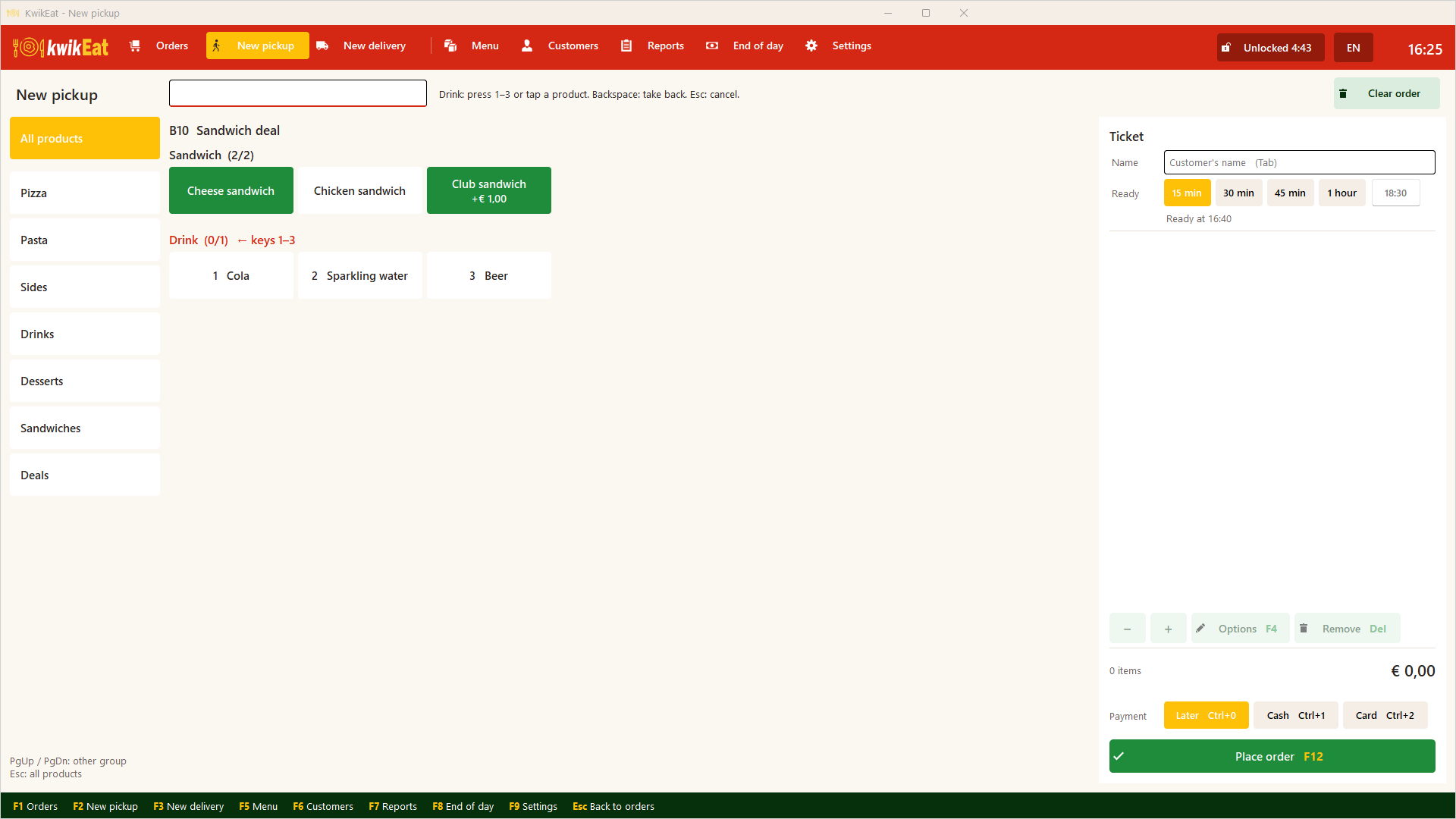
More or fewer of a combination, or removing it, always applies to the whole combination. Repeat last order brings a combination back with the same choices, at today's prices.
The receipt and the kitchen ticket show the combination with the chosen products indented below it, each with its own options.
Keep in mind
- Put combinations in a group of their own without group options. A group option also applies to the combination itself, but the combination has no amount of its own: an extra charge on it doesn't count. Options belong to the chosen products.
- No combination inside a combination. Combinations are not offered under To choose from.
- A deal is not recognised by itself. If someone orders two sandwiches and a drink separately, they pay the separate prices. At the counter, choose the deal itself.
- Size on a half-and-half pizza. In a combination KwikEat asks each half's options separately. If your pizzas have a Size option with a charge, it counts per half. How to solve that is under Double Dutch.
Read on
- Deals and availability: a combination only on Mondays, only for collection, or only between 11 and 2.
- Examples: the sandwich deal, 3 pizzas for 2, Double Dutch and more, step by step.
Last updated: 15 October 2026